ChaChing Webhooks allow your system to receive real-time notifications when events occur in your ChaChing account (e.g., customer updates, payments, subscriptions).
Webhooks are designed for clients using the public API, which allows them to react to system changes without polling.
- An event occurs in ChaChing (e.g., customer details updated). For details related to the event types, refer to the section Event Types.
- ChaChing generates an event notification.
- ChaChing identifies all active webhook endpoints configured for the account.
- ChaChing sends the event with its payload as an HTTP POST request to each webhook endpoint. Note: For payload details, refer to the Event Structure section.
- Your system receives and processes the event.
- Your endpoint must return an HTTP
2xxresponse:- A
2xxresponse sets the delivery status tosuccess - A
5xxresponse is retryable: the delivery status isretrywhile retries remain, and the delivery is retried according to the retry policy below - An HTTP
408(Request Timeout) and an HTTP429(Too Many Requests) are also treated as retryable - No response at all — network failure, DNS failure, connection timeout, read timeout — is also treated as retryable
- Any other non-
2xxresponse is a permanent rejection: every3xxredirect and every4xxother than408and429(for example400,401,403,404,410). The delivery status is set tofailureimmediately and the delivery is never retried
- A
ChaChing automatically retries failed webhook deliveries.
Retries are triggered when:
- Network failure
- Timeout
- HTTP
5xxresponse - HTTP
408(Request Timeout) - HTTP
429(Too Many Requests)
Retries are not triggered when the endpoint returns any other non-2xx status — every 3xx redirect and every 4xx other than 408 and 429, for example 400, 401, 403, 404 and 410. Those statuses tell ChaChing the endpoint will never accept this payload, so the delivery status is set to failure after the first attempt and the returned status code is recorded in the delivery log.
Retry Flow:
- If a delivery fails with a retryable condition, the webhook is retried
- If max retries NOT reached, retry continues
- If max retries reached, the delivery status is set to
failure - If a delivery is permanently rejected, no retry is scheduled and the delivery status is set to
failureright away
Retry Policy:
- Attempts: 5 retries after the first delivery, for a maximum of 6 delivery attempts
- Retry window: approximately 43 minutes — the delays between attempts are approximately 15 seconds, 45 seconds, 2 minutes, 10 minutes and 30 minutes, each randomized by up to 20% in both directions
⚠️ Webhooks may be delivered multiple times. Ensure your system handles duplicates (use event
id).
- Webhooks are configured per account
- Each account has its own webhook endpoints
- Events generated in one account are not shared with other accounts
- You can create multiple webhook endpoints
- Events are sent to all active endpoints within the account
Webhooks can be managed via the UI (Settings → Developer → Webhooks) or programmatically via the REST API. Both approaches support the full lifecycle: create, list, update, enable/disable, and delete endpoints.
Only users with the Developer or SuperAdmin role can manage webhooks. For user roles details, refer to the section Manage → Users in the left panel of the ChaChing application.
- In ChaChing, go to Settings → Developer settings.
- In the Developer Settings, select the Webhooks tab to:
- Create webhook endpoints
- View all endpoints
- Enable / disable endpoints
- Edit/Delete endpoints
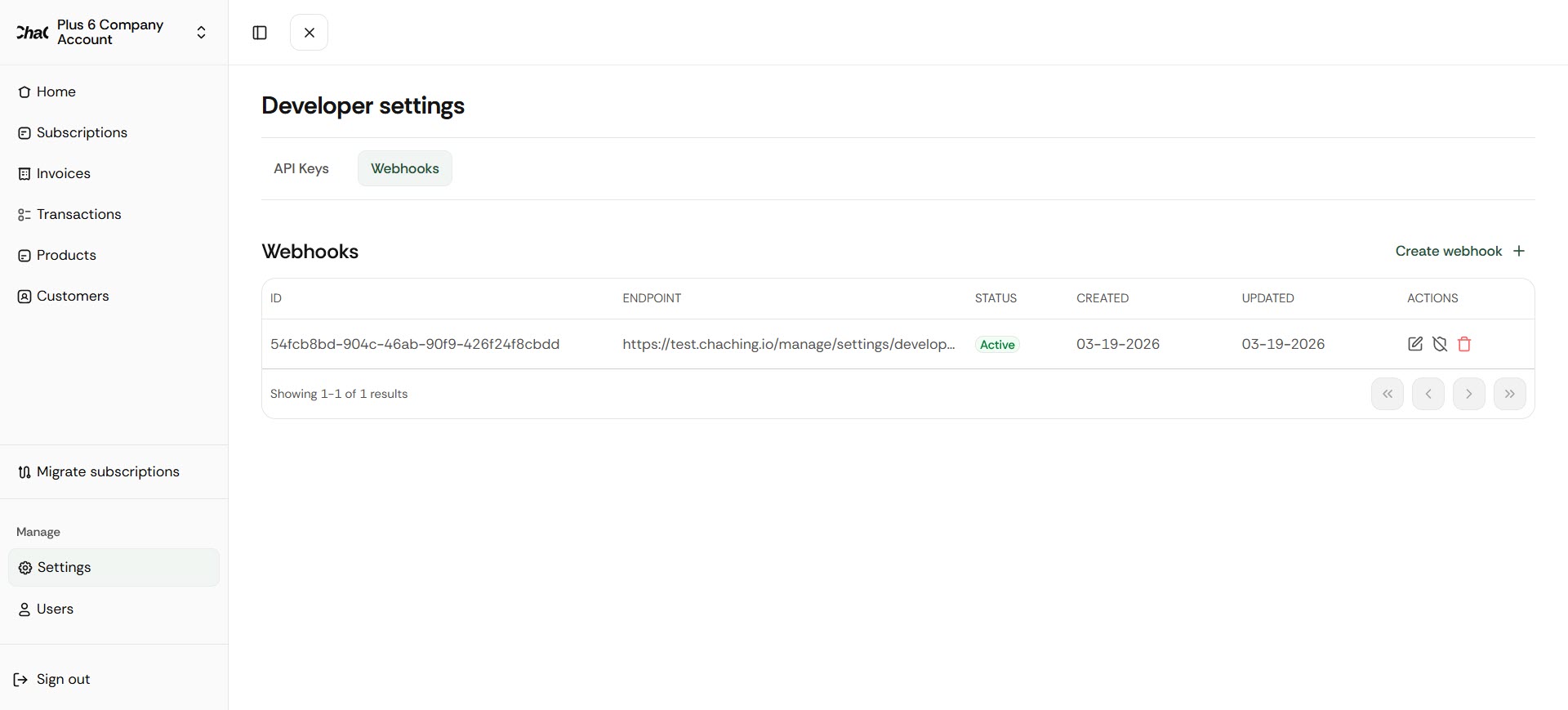
- Open Developer Settings → Webhooks.
- Click Create webhook.
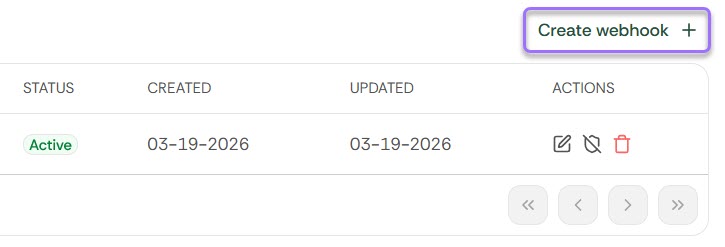
- Enter endpoint URL and then select Create endpoint.
After creation:
- Webhook becomes active
- Events start being delivered immediately
All endpoints require authentication.
| Method | Path | Description |
|---|---|---|
POST | /webhook/destination | Create a new webhook endpoint |
GET | /webhook/destination | List all webhook endpoints |
PUT | /webhook/destination/:id | Update a webhook endpoint |
DELETE | /webhook/destination/:id | Delete a webhook endpoint |
PATCH | /webhook/destination/:id/enable | Enable a webhook endpoint |
PATCH | /webhook/destination/:id/disable | Disable a webhook endpoint |
GET | /webhook/logs | Retrieve webhook delivery logs |
POST /webhook/destinationRequest body:
{
  "url": "https://your-server.com/webhook"
}
Response: the created webhook destination object, including its id and active status.
GET /webhook/destinationResponse: array of all webhook destination objects for the account.
PUT /webhook/destination/:idRequest body:
{
  "url": "https://your-server.com/new-webhook"
}PATCH /webhook/destination/:id/enable
PATCH /webhook/destination/:id/disableNo request body required.
DELETE /webhook/destination/:idGET /webhook/logsResponse: list of webhook delivery log entries. Each entry includes the event type, payload, and status (pending / retry / success / failure).
ChaChing generates webhook events for key system entities. Each event represents a specific change or action performed in the system.
Note: When you create a webhook you receive ALL events without the ability to subscribe to a specific event type.
customer.created— A new customer is createdcustomer.updated— An existing customer is updatedcustomer.deleted— A customer is deleted
payment_method.attached— A payment method is attached to a customer, through the dashboard, the API or the customer portal. When the card is already saved for that customer, the event carries the saved payment methodpayment_method.detached— A payment method is detached from a customer
invoice.created— A new invoice is createdinvoice.deleted— An invoice is deletedinvoice.finalized— An invoice is finalized and ready for paymentinvoice.sent— An invoice is sent to the customerinvoice.payment_succeeded— Invoice payment completed successfullyinvoice.payment_failed— Invoice payment failed
subscription.created— A subscription is createdsubscription.updated— A subscription is updatedsubscription.canceled— A subscription is canceledsubscription.paused— A subscription is pausedsubscription.resumed— A paused subscription is resumed
product.created— A product is createdproduct.updated— A product is updatedproduct.deleted— A product is deleted
price.created— A price is createdprice.updated— A price is updatedprice.deleted— A price is deleted
tax.created— A tax configuration is createdtax.updated— A tax configuration is updated
payment_plan.created— A payment plan is createdpayment_plan.activated— A payment plan starts runningpayment_plan.installment_paid— An installment of a payment plan is paidpayment_plan.installment_failed— An automatic charge attempt on an installment is declinedpayment_plan.past_due— A payment plan changes topast_duepayment_plan.defaulted— A payment plan changes todefaultedpayment_plan.reactivated— A payment plan returns toactivefrompast_dueordefaultedpayment_plan.completed— A payment plan is paid offpayment_plan.canceled— A payment plan is canceledpayment_plan.payment_succeeded— A payment is recorded on a payment plan
ChaChing currently supports 34 webhook event types across such entities as:
- Customers
- Payment Methods
- Invoices
- Subscriptions
- Products
- Prices
- Taxes
- Payment Plans
ChaChing generates webhook events for charges its billing engine initiates on its own — subscription renewals and their scheduled retries — in addition to charges started from the Dashboard, the hosted checkout page, and the REST API.
An automatic subscription renewal produces the following sequence of events:
invoice.created— the renewal invoice is createdinvoice.finalized— the invoice is committed and ready for paymentinvoice.payment_succeeded— the charge succeeds, orinvoice.payment_failed— the charge is declined
A retry of an automatic charge that fails produces its own invoice.payment_failed event. The subscription events for the failed-payment outcomes configured in Invoices & Subscriptions settings are described in Track subscription lifecycle and failed payments. That page also documents the retry timeline, how the outcome day is counted, and when next_payment_attempt is present.
subscription.canceled, subscription.paused and subscription.resumed carry two additional fields that distinguish who caused the transition:
reason—"dunning"when the transition is driven by the billing engine, or"requested"when it is driven by an API call or a Dashboard actioninitiated_by—"system"for a dunning-driven transition, or"merchant"for an API- or Dashboard-driven one
Both fields are absent on subscription.created and subscription.updated.
Every event is delivered at least once. Deduplicate on the envelope's id field, as described in Important Notes for Integrators.
Webhook delivery has the following internal states:
pending→ waiting to be sentretry→ retry in progresssuccess→ delivered successfullyfailure→ the delivery was abandoned. Two situations produce it: the endpoint returned a permanent rejection, in which case no retry was attempted at all; and the endpoint kept failing with retryable conditions until every retry was exhausted. The response status code recorded on the delivery log entry tells the two apart
All ChaChing webhook events share a common envelope structure, with the actual entity data contained inside the data field.
Every webhook sent by ChaChing follows this structure:
{
  "id": "evt_123456",
  "event": "customer.updated", // specific to the event type
  "createdAt": "2026-03-13T11:15:00Z",
  "data": {
    // Entity-specific payload
  }
}id— Unique event identifier (used for deduplication)event— Event type (see Event Types section)createdAt— Timestamp when the event was generateddata— Entity payload (varies depending on event type)
❗ Important:
dataalready contains the object. There is nodata.objectnesting.
Events:
customer.createdcustomer.updatedcustomer.deleted
{
  "id": "cus_XXXXXXXX",
  "object": "customer",
  "name": "string",
  "email": "string",
  "description": "string | null",
  "phone": "string | null",
  "created": 1672531200,
  "currency": "string",
  "address": [
    {
      "city": "string",
      "country": "string",
      "line1": "string",
      "line2": "string",
      "postal_code": "string",
      "state": "string"
    }
  ],
  "shipping": {
    "name": "string",
    "phone": "string | null",
    "address": {
      "city": "string",
      "country": "string",
      "line1": "string",
      "line2": "string",
      "postal_code": "string",
      "state": "string"
    }
  }
}{
"id": "evt_111",
"event": "customer.created",
"createdAt": "2026-03-13T11:15:00Z",
"data": {
"id": "cus_NffrFeUfNV2Hib",
"object": "customer",
"name": "John Doe",
"email": "john.doe@example.com",
"description": "My First Test Customer",
"phone": null,
"created": 1680893993,
"currency": "USD",
"address": [
{
"city": "San Francisco",
"country": "US",
"line1": "123 Market St",
"line2": "Apt 4B",
"postal_code": "94103",
"state": "CA"
}
],
"shipping": {
"name": "John Doe",
"phone": "+1 (555) 123-4567",
"address": {
"city": "San Francisco",
"country": "US",
"line1": "123 Market St",
"line2": "Apt 4B",
"postal_code": "94103",
"state": "CA"
}
}
}
}- The
addressfield is an array of address objects - The
shipping.addressis a single object (not an array) - The
phoneanddescriptionfields may benull - Timestamps are in Unix format (seconds)
Events:
payment_method.attachedpayment_method.detached
{
  "id": "pm_XXXXXXXX",
  "object": "payment_method",
  "allow_redisplay": "string",
  "billing_details": {
    "address": {
      "city": "string | null",
      "country": "string | null",
      "line1": "string | null",
      "line2": "string | null",
      "postal_code": "string | null",
      "state": "string | null"
    },
    "email": "string | null",
    "name": "string | null",
    "phone": "string | null"
  },
  "created": 1672531200,
  "customer": "cus_XXXXXXXX | null",
  "livemode": false,
  "metadata": {},
  "type": "string",
  "us_bank_account": {
    "account_holder_type": "individual | company",
    "account_type": "checking | savings",
    "bank_name": "string",
    "financial_connections_account": "string | null",
    "fingerprint": "string",
    "last4": "string",
    "networks": {
      "preferred": "string",
      "supported": ["string"]
    },
    "routing_number": "string",
    "status_details": {}
  }
}{
"id": "evt_123",
"event": "payment_method.attached",
"createdAt": "2026-03-13T11:15:00Z",
"data": {
"id": "pm_1Q0PsIJvEtkwdCNYMSaVuRz6",
"object": "payment_method",
"allow_redisplay": "unspecified",
"billing_details": {
"address": {
"city": null,
"country": null,
"line1": null,
"line2": null,
"postal_code": null,
"state": null
},
"email": null,
"name": "John Doe",
"phone": null
},
"created": 1726673582,
"customer": null,
"livemode": false,
"metadata": {},
"type": "us_bank_account",
"us_bank_account": {
"account_holder_type": "individual",
"account_type": "checking",
"bank_name": "STRIPE TEST BANK",
"financial_connections_account": null,
"fingerprint": "LstWJFsCK7P349Bg",
"last4": "6789",
"networks": {
"preferred": "ach",
"supported": [
"ach"
]
},
"routing_number": "110000000",
"status_details": {}
}
}
}- The
typefield defines the structure of the payment method (e.g.,card,us_bank_account) - The corresponding object (e.g.,
us_bank_account) is included based on thetype - Some fields may be
nulldepending on the payment method and available data
Events:
invoice.createdinvoice.deletedinvoice.finalizedinvoice.sentinvoice.payment_succeededinvoice.payment_failed
{
  "id": "string",
  "object": "invoice",
  "account_country": "string",
  "account_name": "string",
  "amount_due": 0,
  "amount_paid": 0,
  "surcharge_amount": 0,
  "amount_charged": 0,
  "amount_remaining": 0,
  "attempt_count": 0,
  "next_payment_attempt": 1672531200,
  "attempted": true,
  "billing_reason": "string",
  "collection_method": "string",
  "created": 1672531200,
  "currency": "string",
  "customer": "cus_XXXXXXXX",
  "customer_address": {
    "city": "string",
    "country": "string",
    "line1": "string",
    "line2": "string",
    "postal_code": "string",
    "state": "string"
  },
  "customer_email": "string",
  "customer_name": "string",
  "customer_phone": "string",
  "lines": [],
  "number": "string",
  "paid": true,
  "period_end": 1672531200,
  "period_start": 1672531200,
  "status": "draft | open | paid | void",
  "status_transitions": {
    "finalized_at": 1672531200,
    "paid_at": 1672531200,
    "voided_at": 1672531200
  },
  "subscription": "sub_XXXXXXXX",
  "payment_plan": "pp_XXXXXXXX | null",
  "installment": "ppi_XXXXXXXX | null",
  "subtotal": 0,
  "subtotal_excluding_tax": 0,
  "tax": 0,
  "total": 0,
  "total_excluding_tax": 0,
  "total_taxes": {
    "amount": 0,
    "tax_behavior": "inclusive | exclusive",
    "tax_rate": "txr_XXXXXXXX",
    "taxable_amount": 0
  }
}
surcharge_amount and amount_charged sum the invoice's successful payments, in cents: the card surcharge added to them and the total charged to the card. amount_charged equals amount_paid when no surcharge was added.
{
  "id": "evt_456",
  "event": "invoice.payment_succeeded",
  "createdAt": "2026-03-13T11:15:00Z",
  "data": {
    "id": "a80baa67-1341-4184-b712-b6f9b85b5a2b",
    "object": "invoice",
    "account_country": "US",
    "account_name": "Acme Corp",
    "amount_due": 1500,
    "amount_paid": 500,
    "surcharge_amount": 0,
    "amount_charged": 500,
    "amount_remaining": 1000,
    "attempt_count": 1,
    "next_payment_attempt": null,
    "attempted": true,
    "billing_reason": "subscription",
    "collection_method": "charge_automatically",
    "created": 1680645568,
    "currency": "USD",
    "customer": "cus_383fda0065594749023e8c8d",
    "customer_address": {
      "city": "San Francisco",
      "country": "US",
      "line1": "123 Market St",
      "line2": "Apt 4B",
      "postal_code": "94103",
      "state": "CA"
    },
    "customer_email": "john.doe@example.com",
    "customer_name": "John Doe",
    "customer_phone": "+1234567890",
    "lines": [],
    "number": "INV-1001",
    "paid": true,
    "period_end": 1680645568,
    "period_start": 1680645568,
    "status": "paid",
    "status_transitions": {
      "finalized_at": 1680645568,
      "paid_at": 1680645568,
      "voided_at": 1680645568
    },
    "subscription": "sub_Wm45f5PGQvv67azFeH1z7PO3",
    "subtotal": 1500,
    "subtotal_excluding_tax": 1500,
    "tax": 150,
    "total": 1650,
    "total_excluding_tax": 1500,
    "total_taxes": {
      "amount": 150,
      "tax_behavior": "exclusive",
      "tax_rate": "txr_1S2tlWDZYOQH9uHkltYEi1ap",
      "taxable_amount": 1500
    }
  }
}- The
statusfield reflects the current lifecycle state of the invoice status_transitionsshows timestamps for key lifecycle changes- Monetary values are represented in the smallest currency unit (e.g., cents)
- The
linesfield contains invoice line items (structure may vary) - Some fields may be
nulldepending on invoice state and configuration attempt_countis present on every invoice event.next_payment_attemptis present only oninvoice.payment_succeededandinvoice.payment_failedfor an automatic charge; see Track subscription lifecycle and failed payments for when it is present and whatnullmeansnext_payment_attemptis a Unix timestamp in seconds, matching every other timestamp in this payloadpayment_planandinstallmentname the payment plan and the installment an invoice was raised for. Both arenullon an invoice that belongs to no payment plan, and an invoice raised for a payment plan reportssubscription: null. See Payment Plans
Events:
subscription.createdsubscription.updatedsubscription.canceledsubscription.pausedsubscription.resumed
{
  "id": "sub_XXXXXXXX",
  "object": "subscription",
  "billing_cycle_anchor": 1672531200,
  "cancel_at": 1672531200,
  "cancel_at_period_end": false,
  "canceled_at": 1672531200,
  "collection_method": "string",
  "created": 1672531200,
  "currency": "string",
  "customer": "cus_XXXXXXXX",
  "reason": "dunning | requested",
  "initiated_by": "system | merchant",
  "ended_at": 1672531200,
  "items": {
    "object": "list",
    "data": [
      []
    ],
    "total_count": 0
  },
  "latest_invoice": "string",
  "start_date": 1672531200,
  "status": "active | trial | scheduled | paused | unpaid | cancelled | expired",
  "trial_end": 1672531200,
  "trial_start": 1672531200
}{
"id": "evt_789",
"event": "subscription.created",
"createdAt": "2026-03-13T11:15:00Z",
"data": {
"id": "sub_2FdhgypnsJQn9mZlY5qGaElL",
"object": "subscription",
"billing_cycle_anchor": 1679609767,
"cancel_at": null,
"cancel_at_period_end": false,
"canceled_at": null,
"collection_method": "charge_automatically",
"created": 1679609767,
"currency": "USD",
"customer": "cus_739c07713fd4b68565a969cd",
"ended_at": null,
"items": {
"object": "list",
"data": [
[]
],
"total_count": 1
},
"latest_invoice": "58d0f1c9-ca00-4998-8e89-d74a290b4df6",
"start_date": 1679609767,
"status": "active",
"trial_end": null,
"trial_start": null
}
}The following example shows a subscription.canceled event driven by the billing engine's dunning process, carrying reason and initiated_by:
{
  "id": "evt_790",
  "event": "subscription.canceled",
  "createdAt": "2026-03-13T11:15:00Z",
  "data": {
    "id": "sub_2FdhgypnsJQn9mZlY5qGaElL",
    "object": "subscription",
    "billing_cycle_anchor": 1679609767,
    "cancel_at": 1680645568,
    "cancel_at_period_end": false,
    "canceled_at": 1680645568,
    "collection_method": "charge_automatically",
    "created": 1679609767,
    "currency": "USD",
    "customer": "cus_739c07713fd4b68565a969cd",
    "reason": "dunning",
    "initiated_by": "system",
    "ended_at": 1680645568,
    "items": {
      "object": "list",
      "data": [
        []
      ],
      "total_count": 1
    },
    "latest_invoice": "58d0f1c9-ca00-4998-8e89-d74a290b4df6",
    "start_date": 1679609767,
    "status": "cancelled",
    "trial_end": null,
    "trial_start": null
  }
}- The
statusfield is one ofactive,trial,scheduled,paused,unpaid,cancelled, orexpired; see Track subscription lifecycle and failed payments. The event namesubscription.canceledis spelled with onel, and the status valuecancelledwith two - Fields like
cancel_at,canceled_at, andended_atmay benulldepending on lifecycle state items.datacontains subscription items (structure depends on pricing configuration)latest_invoicelinks the most recent invoice associated with the subscription- Timestamps are in Unix format (seconds)
reasonandinitiated_byare present onsubscription.canceled,subscription.pausedandsubscription.resumed, and absent onsubscription.createdandsubscription.updated- The two fields always travel together:
"dunning"is always paired with"system", and"requested"is always paired with"merchant" items.data[].price.typeisone_time,recurringornull: it isnullfor an item whose price cannot be resolved. Handlenullwherever you branch on the price type
Events:
product.createdproduct.updatedproduct.deleted
{
  "id": "prod_XXXXXXXX",
  "object": "product",
  "active": true,
  "created": 1672531200,
  "default_price": "price_XXXXXXXX",
  "description": "string | null",
  "name": "string",
  "tax_code": "string",
  "updated": 1672531200
}{
"id": "evt_321",
"event": "product.updated",
"createdAt": "2026-03-13T11:15:00Z",
"data": {
"id": "prod_xT4LfvxLMQb4s9uFNIbXf9pm",
"object": "product",
"active": true,
"created": 1760018761,
"default_price": "price_1SGKTmDZYOQH9uHk1vaSxPKa",
"description": null,
"name": "Gold Plan",
"tax_code": "txcd_10000000",
"updated": 1753181495
}
}- The
default_pricefield references the default price associated with the product - The
descriptionfield may benullif not provided - The
activefield indicates whether the product is available for use - Timestamps are in Unix format (seconds)
Events:
price.createdprice.updatedprice.deleted
{
  "id": "price_XXXXXXXX",
  "object": "price",
  "active": true,
  "created": 1672531200,
  "currency": "string",
  "description": "string | null",
  "product": "prod_XXXXXXXX | null",
  "recurring": {
    "interval": "day | week | month | year",
    "interval_count": 1
  } | null,
  "tax_behavior": "inclusive | exclusive",
  "type": "one_time | recurring",
  "unit_amount": 0,
  "unit_amount_decimal": "string",
  "link": "string"
}{
"id": "evt_654",
"event": "price.created",
"createdAt": "2026-03-13T11:15:00Z",
"data": {
"id": "price_1SGKTmDZYOQH9uHk1vaSxPKa",
"object": "price",
"active": true,
"created": 1760018761,
"currency": "USD",
"description": "Premium Plan - Monthly",
"product": null,
"recurring": null,
"tax_behavior": "exclusive",
"type": "one_time",
"unit_amount": 1000,
"unit_amount_decimal": "1000",
"link": "string"
}
}- The
typefield defines whether the price is one-time or recurring - The
recurringobject isnullwhentypeisone_time, and a{ interval, interval_count }object whentypeisrecurring. unit_amountis represented in the smallest currency unit (e.g., cents)productmay benullif not linkedunit_amount_decimalprovides a precise representation of the amounttax_behaviordefines how taxes are applied (inclusive or exclusive)
Events:
tax.createdtax.updated
{
  "id": "txr_XXXXXXXX",
  "object": "tax_rate",
  "active": true,
  "country": "string",
  "created": 1672531200,
  "description": "string | null",
  "display_name": "string",
  "inclusive": true,
  "percentage": 0,
  "tax_type": "string"
}{
"id": "evt_987",
"event": "tax.created",
"createdAt": "2026-03-13T11:15:00Z",
"data": {
"id": "txr_inQ4hbLZPyljDXFRCEnjtEqK",
"object": "tax_rate",
"active": true,
"country": "US",
"created": 1678833149,
"description": "State sales tax",
"display_name": "Sales Tax",
"inclusive": true,
"percentage": 7.25,
"tax_type": "Custom"
}
}- The
percentagefield represents the tax rate (e.g.,7.25= 7.25%) - The
inclusivefield indicates whether the tax is included in the price tax_typedefines the type of tax configuration (e.g., custom)- The
descriptionfield may benulldepending on configuration
Events:
payment_plan.createdpayment_plan.activatedpayment_plan.past_duepayment_plan.defaultedpayment_plan.reactivatedpayment_plan.completedpayment_plan.canceled
carry the Payment Plan object.
payment_plan.installment_paidpayment_plan.installment_failed
carry the Installment object.
payment_plan.payment_succeeded
carries the Payment object.
{
  "id": "pp_XXXXXXXX",
  "object": "payment_plan",
  "customer": "cus_XXXXXXXX",
  "description": "string | null",
  "status": "awaiting_deposit | active | past_due | defaulted | paid_off | canceled",
  "currency": "string",
  "total_amount": 0,
  "down_payment_amount": 0,
  "installment_amount": 0,
  "installment_count": 0,
  "interval": "weekly | biweekly | monthly",
  "start_date": 1672531200,
  "remainder_placement": "first | last",
  "remaining_balance": 0,
  "installments_paid": 0,
  "installments_remaining": 0,
  "next_due_date": "1672531200 | null",
  "payment_method": "string | null",
  "gateway": "string | null",
  "reference": "string | null",
  "deposit": {
    "reference": "string",
    "amount": 0,
    "status": "pending | collected",
    "transaction_reference": "string | null",
    "collected_at": "1672531200 | null",
    "attempt": {
      "id": "ppda_XXXXXXXX",
      "object": "payment_plan_deposit_attempt",
      "terminal": "string",
      "reference_id": "string",
      "state": "in_flight | resolving | approved | approved_no_credential | declined | cancelled | not_charged | failed | partial_approval | force_closed",
      "started": 1672531200,
      "resolved": "1672531200 | null",
      "decline_code": "string | null",
      "decline_message": "string | null",
      "surcharge_amount": 0,
      "amount_charged": 0
    }
  },
  "created": 1672531200,
  "ended_at": "1672531200 | null",
  "canceled_at": "1672531200 | null"
}{
"id": "ppi_XXXXXXXX",
"object": "payment_plan_installment",
"payment_plan": "pp_XXXXXXXX",
"sequence": 0,
"due_date": 1672531200,
"amount": 0,
"amount_paid": 0,
"surcharge_amount": 0,
"amount_charged": 0,
"status": "scheduled | paid | failed | canceled",
"attempt_count": 0,
"next_payment_attempt": "1672531200 | null",
"paid_at": "1672531200 | null",
"invoice": "string | null"
}{
"id": "ppp_XXXXXXXX",
"object": "payment_plan_payment",
"payment_plan": "pp_XXXXXXXX",
"status": "processing | applied | partially_applied",
"amount": 0,
"surcharge_amount": 0,
"amount_charged": 0,
"external": false,
"payment_method": "string | null",
"invoice": "string | null",
"payoff": false,
"created": 1672531200,
"payment_plan_status": "awaiting_deposit | active | past_due | defaulted | paid_off | canceled",
"remaining_balance": 0,
"installments_remaining": 0,
"terminal": "object | null"
}The terminal object the event emits carries all 17 keys of the terminal object described in Take a Payment on a Terminal, and its state is approved or partial_approval at emission.
payment_plan.installment_failed, with a retry scheduled:
{
  "id": "evt_9f2a7c41",
  "event": "payment_plan.installment_failed",
  "createdAt": "2025-11-14T09:00:12Z",
  "data": {
    "id": "ppi_Mc8yS3Rb",
    "object": "payment_plan_installment",
    "payment_plan": "pp_8QN4mTcRk2VwZfLp",
    "sequence": 2,
    "due_date": 1763078400,
    "amount": 20000,
    "amount_paid": 0,
    "surcharge_amount": 0,
    "amount_charged": 0,
    "status": "failed",
    "attempt_count": 1,
    "next_payment_attempt": 1763164800,
    "paid_at": null,
    "invoice": "c1f0d9aa-2b44-4d19-9d02-77b2aa4e1c30"
  }
}payment_plan.completed:
{
  "id": "evt_d41c07ab",
  "event": "payment_plan.completed",
  "createdAt": "2026-06-14T00:07:31Z",
  "data": {
    "id": "pp_8QN4mTcRk2VwZfLp",
    "object": "payment_plan",
    "customer": "cus_739c07713fd4b68565a969cd",
    "description": "Orthodontic treatment, upper and lower braces",
    "status": "paid_off",
    "currency": "USD",
    "total_amount": 210000,
    "down_payment_amount": 30000,
    "installment_amount": 20000,
    "installment_count": 9,
    "interval": "monthly",
    "start_date": 1760400000,
    "remainder_placement": "first",
    "remaining_balance": 0,
    "installments_paid": 9,
    "installments_remaining": 0,
    "next_due_date": null,
    "payment_method": "9f3a1c2e-7b45-4d18-a6c0-2f8e5b7d1a94",
    "gateway": "dejavoo",
    "reference": null,
    "deposit": null,
    "created": 1757894400,
    "ended_at": 1781395651,
    "canceled_at": null
  }
}
payment_plan.payment_succeeded for a payment that reached the principal:
{
  "id": "evt_5b0e93f2",
  "event": "payment_plan.payment_succeeded",
  "createdAt": "2025-11-18T16:26:40Z",
  "data": {
    "id": "ppp_4Hk9Tz2W",
    "object": "payment_plan_payment",
    "payment_plan": "pp_8QN4mTcRk2VwZfLp",
    "status": "applied",
    "amount": 50000,
    "surcharge_amount": 0,
    "amount_charged": 50000,
    "external": false,
    "payment_method": "9f3a1c2e-7b45-4d18-a6c0-2f8e5b7d1a94",
    "invoice": "d5b9e2c1-8a41-4f36-9c17-3ad0b1e5f882",
    "payoff": false,
    "created": 1763483200,
    "payment_plan_status": "active",
    "remaining_balance": 130000,
    "installments_remaining": 7,
    "terminal": null
  }
}- The Payment Plan object in
datais the plan after the change, and itsstatusis the plan's status when the event is sent. A plan created with a payment method sendspayment_plan.createdandpayment_plan.activatedwith the same object,status: "active" payment_plan.installment_failedis sent once per declined automatic charge attempt, retries included. A declined payment throughPOST /payment-plans/{id}/paymentsanswers the request with an error instead and sends nopayment_plan.installment_failed.attempt_countcounts the attempts made on the installment, andnext_payment_attemptis the date of the next retry, ornullwhen no retry is scheduledpayment_plan.installment_paidis sent once per installment. The down payment charged at creation sends it withsequence: 0depositisnullfor a plan created with a payment method. For a plan created without one,deposit.attemptisnulluntil the first terminal attempt and then holds the latest attempt; see Collect the First Installment on a Terminalpayment_plan.completedis the single paid-in-full event. It is sent when the schedule ends with every installment paid, when a payoff payment is recorded, and when the last unpaid installment is paid through the hosted invoice page, the dashboard orPUT /invoices/{id}or settled by credit;statusispaid_offin every casepayment_plan.payment_succeededis sent for every paymentPOST /payment-plans/{id}/paymentsrecords — installment payments, principal payments, payoffs and external payments alike — and never for a declined or refused one. Itsdatais the Payment object at the moment the payment is recorded:id,amount,external,payment_method,invoiceandpayoffmatch the endpoint's response (except for a payment taken on a terminal, whose201isprocessingwithamount0: the event carries the final values), while for a payment that reached the principalremaining_balance,installments_remainingandpayment_plan_statusdescribe the plan before its schedule is rebuilt right after — the balance can still include the principal, and adefaultedplan that the rebuild returns toactivestill readsdefaulted; read the plan for the current values. A repeated request with the sameIdempotency-Keysends nothing again. When a request ends before its payment is fully recorded, ChaChing finishes recording it later and sends the payment's events then. For one payment they are sent in this order:payment_plan.installment_paid, thenpayment_plan.payment_succeeded, thenpayment_plan.completed; a delivery that is retried can arrive after a later event. This event is sent only withstatusappliedorpartially_applied.surcharge_amountandamount_chargedon the Installment and Payment objects report the card surcharge and the total charged to the card, in cents. While ChaChing cannot read the surcharge from the gateway yet, they read0and the amount paid, and the event is not sent again when the real values arrive: read the plan's installments for them. When ChaChing cannot read the surcharge of a charge (after retrying for up to 7 days, or at once when the charge cannot be matched), the objects keepsurcharge_amountat0andamount_chargedequal to the amount paid, and that does not change later; the exact amount charged to the card is then the one shown for that transaction in your Dejavoo (iPOSpays) account. See Card Surcharges- The principal part of a payment belongs to no invoice and sends no
invoice.*event:payment_plan.payment_succeededis the event that reports it terminalon the Payment object isnullfor a payment that was not taken on a terminal. For a payment taken on a terminal it holds the sale, andpayment_plan.payment_succeededis sent when ChaChing records it after the terminal approved it; see Take a Payment on a Terminal- The plan status
past_duemeans the customer's account is in the late-payment warning. It is not thepast-duefailed-payment outcome: reaching that outcome sendspayment_plan.defaulted - The
invoice.*events keep firing for every installment invoice; the invoice payload'spayment_planandinstallmentfields link it back to the plan - The spelling is
canceled, with onel, for both the status and the event - One change can send several events, and deliveries can arrive in any order. Read the plan with
GET /payment-plans/{id}for its current state; see Payment Plans
The data object is contained inside the data field.
- The
datafield contains the full entity object
Deleted events
- May contain limited data (e.g., only
id) - Should not be assumed to contain full object
Always rely on event
- Use
eventfield to determine how to parsedata
- The payload reflects the entity after change
- Example:
- Customer updated → full updated customer data is sent
- Subscription created → full subscription object is sent
{
  "id": "evt_789",
  "event": "customer.updated",
  "createdAt": "2026-03-13T11:15:00Z",
  "data": {
    "id": "cus_123",
    "email": "user@example.com",
    "status": "active"
  }
}- Method:
POST - Content-Type:
application/json - Sent to: configured endpoint URL in ChaChing application.
ChaChing signs every webhook delivery with an HMAC-SHA256 signature. Verify this signature to confirm the request originated from ChaChing and that the payload has not been tampered with.
Each request includes a Chaching-Signature header in the following format:
Chaching-Signature: t=<unix_timestamp>,v1=<hex_hmac_sha256>t— Unix timestamp of when the request was sentv1— HMAC-SHA256 hex digest of the signed payload
The signature is computed as:
HMAC-SHA256(secretKey, "{timestamp}.{raw_json_body}")Where:
secretKeyis your account's secret key, retrieved viaGET /account/keystimestampis thetvalue from theChaching-Signatureheaderraw_json_bodyis the raw, unparsed request body
⚠️ Always compute the signature against the raw request body, before any JSON parsing. Re-serializing a parsed object may alter whitespace or key ordering and cause signature verification to fail.
GET /account/keysconst crypto = require('crypto');
function verifyWebhookSignature(rawBody, signatureHeader, secretKey) {
const parts = {};
signatureHeader.split(',').forEach(part => {
const idx = part.indexOf('=');
parts[part.slice(0, idx)] = part.slice(idx + 1);
});
const timestamp = parts['t'];
const expectedSig = parts['v1'];
const payload = `${timestamp}.${rawBody}`;
const computedSig = crypto
.createHmac('sha256', secretKey)
.update(payload)
.digest('hex');
return crypto.timingSafeEqual(
Buffer.from(computedSig),
Buffer.from(expectedSig)
);
}import hmac
import hashlib
def verify_webhook_signature(raw_body: str, signature_header: str, secret_key: str) -> bool:
parts = dict(part.split('=', 1) for part in signature_header.split(','))
timestamp = parts['t']
expected_sig = parts['v1']
payload = f"{timestamp}.{raw_body}"
computed_sig = hmac.new(
secret_key.encode('utf-8'),
payload.encode('utf-8'),
hashlib.sha256
).hexdigest()
return hmac.compare_digest(computed_sig, expected_sig)ℹ️ Use
crypto.timingSafeEqual(Node.js) orhmac.compare_digest(Python) to prevent timing-based attacks when comparing signatures.
ChaChing stores webhook delivery history.
Logs include:
- Event type
- Payload
- Status (
pending/retry/success/failure)
Logs reflect actual data sent from the database
When receiving a webhook:
- Accept HTTP POST request
- Parse JSON payload
- Read
type - Process
data - Return HTTP
200 OK
No event filtering
You will receive all events
➡ You must filter by type in your system
Payload varies per event
data structure depends on event type
➡ You must handle multiple schemas
Retries may cause duplicates
➡ Use id to deduplicate events
Endpoint must be stable
➡ If your endpoint fails → events may be lost after retries