When you click View Details from the Invoices table, you are redirected to the full Invoice Details page. This page provides a complete view of the invoice, including payment attempts, customer information, pricing details, tax calculations, and activity history.
| Field | Description |
|---|---|
| Invoice # | The unique invoice number for this billing record (e.g., Invoice #11927). |
| Status | Current invoice status (e.g., open, paid, void, draft). |
| Charge customer | Button that triggers an immediate payment attempt using the customer’s default payment method. |
When the user clicks Charge customer at the top of the Invoice Details panel, a modal window opens with the following elements:
- Displayed as a non-editable field.
- Example: $0.32
A section showing the customer’s payment methods that can be selected from the drop-down menu.
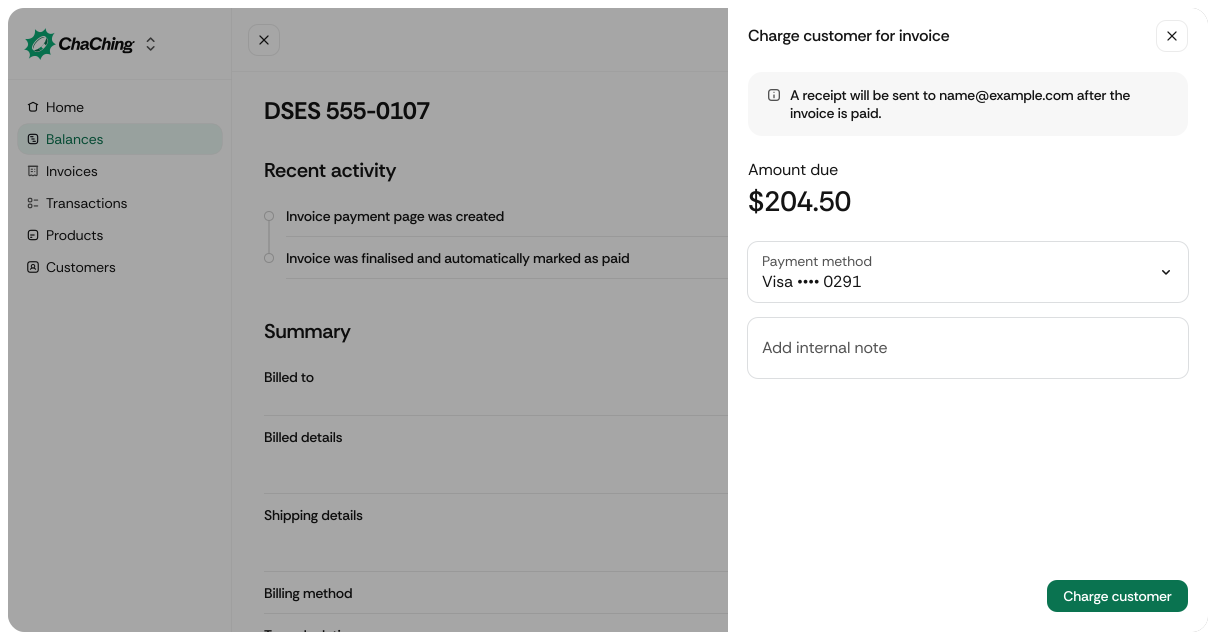
- A text area field.
- Allows the admin/user to add an optional internal note before charging.
Click the button to charge the invoice amount. After submission, the modal closes and activity updates appear in the “Recent activity” section.
Displays system-generated events showing how the invoice progressed.
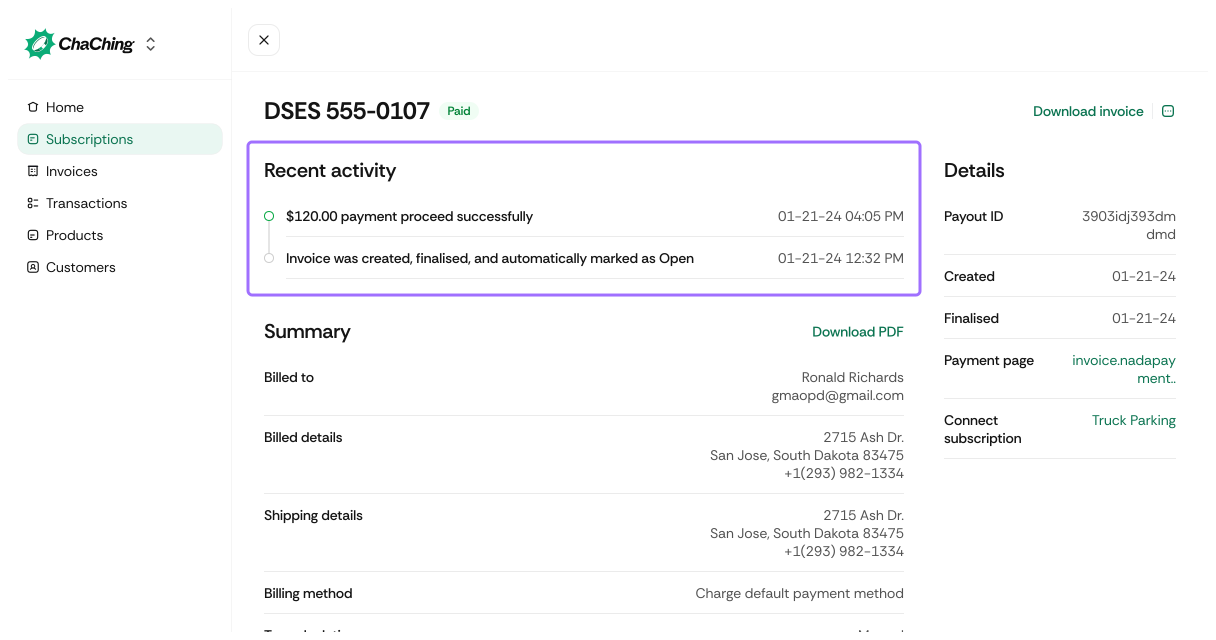
| Activity | Description |
|---|---|
| Payment failure messages | Shows failed payment attempts and the associated error messages (e.g., Amount must be at least $0.50 USD). |
| Invoice creation & finalization | Logs timestamps when the invoice was created, finalized, and marked open. |
| Timestamps | Each entry includes the exact date and time of the event. |

| Field | Description |
|---|---|
| Payout ID | Internal payout or processing identifier for the invoice. |
| Created | The date the invoice was generated. |
| Finalised | The date the invoice was finalized and made payable. |
| Connect subscription | Shows the subscription associated with this invoice (if applicable). |
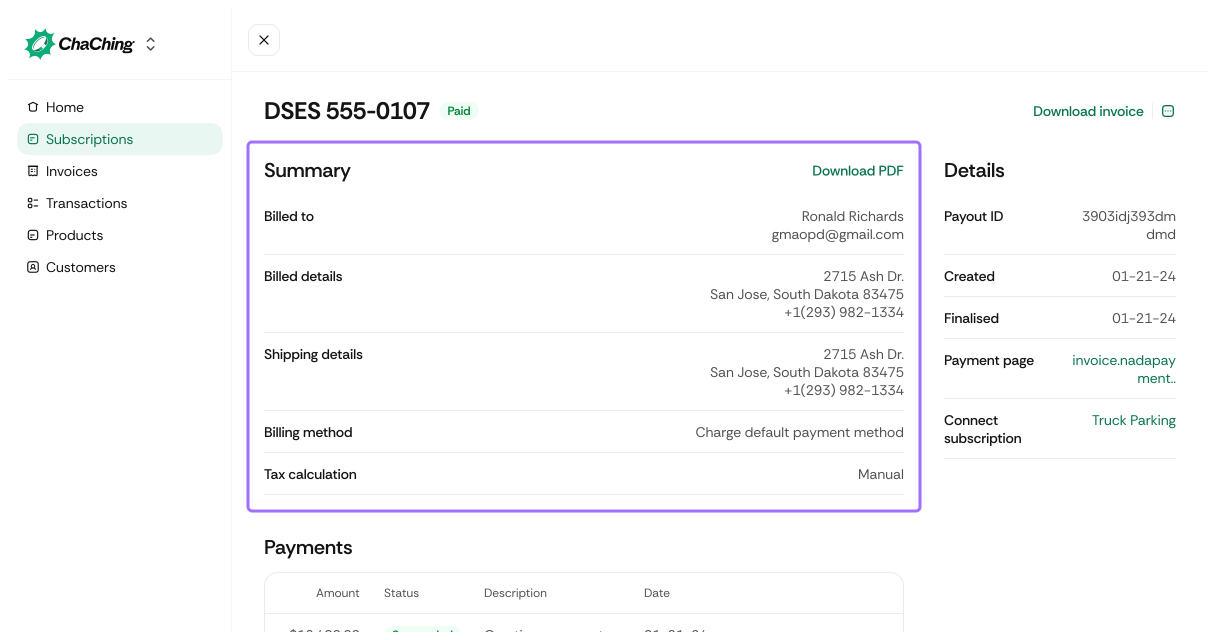
| Field | Description |
|---|---|
| Download PDF | Button to download the invoice as a PDF document. |
| Billed to | Customer name displayed on this invoice. |
| Billing details | Customer’s billing address and contact details. |
| Shipping details | Customer’s shipping address (if provided). |
| Billing method | How payments are charged (e.g., Charge default payment method). |
| Tax calculation | Indicates whether tax is calculated manually or automatically. |
Table showing all payments attempts for this invoice.
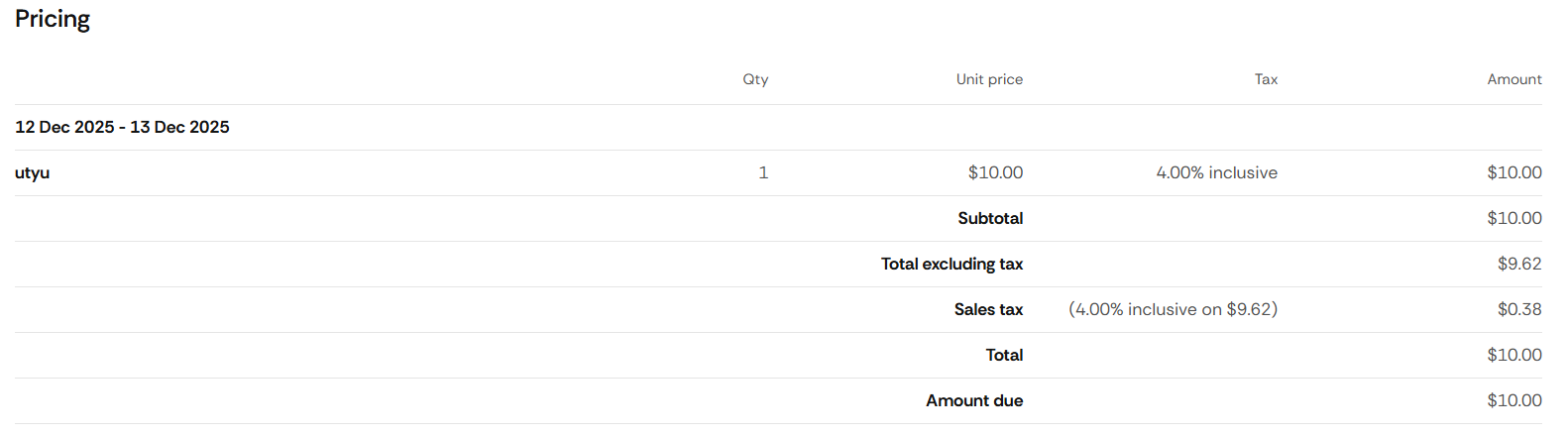
| Field | Description |
|---|---|
| Qty | Quantity of the billed item or service for the invoiced period. |
| Unit price | Price per single unit of the item/service before tax adjustments. |
| Tax | Applicable tax rate and type (e.g., 4.00% inclusive). |
| Amount | Total calculated amount for the line item (Qty × Unit price). |
Clicking the three dots in a payment row opens a detailed payment timeline.
| Field | Description |
|---|---|
| Amount | The attempted payment amount. |
| Status | The detailed internal status (e.g., PURCHASE_ERRORED). |
| Timeline | Step-by-step history such as Payment started, Payment failed, with timestamps. |
| Error message | Shows reason for failure when applicable. |
| Last update | Timestamp of the last system update for this payment. |
| Customer | Customer associated with the payment. |
| Payment ID | Unique identifier for this payment attempt. |
| Payment method | Details of the payment method used (e.g., Visa •••• 4242). |
| Field | Description |
|---|---|
| Billing period | The date range the line item covers, e.g., 12 Dec 2025 – 13 Dec 2025. |
| Item name | The product or subscription name associated with the charge. |
| Subtotal | Sum of all line item amounts before adjusting for tax inclusivity/exclusivity. |
| Total excluding tax | Total amount recalculated without tax included (used when tax is inclusive). |
| Sales tax | Calculated tax amount. Shows: tax rate, tax basis, and resulting value. Example: (4.00% inclusive on $9.62) = $0.38. |
| Total | Full invoice amount including all taxes. |
| Amount due | Remaining amount the customer owes after previous payments or adjustments. |
A preview of the tax configuration applied to this invoice.
| Field | Description |
|---|---|
| Type | The tax category (e.g., Sales tax). |
| Region | Region where the tax applies (e.g., United States). |
| Rate | Tax percentage (e.g., 4.00% inclusive). |
| Tax amount | The monetary value of the tax applied. |