When you click Customers in the left navigation panel, you are taken to the Customers page. This section provides a complete view of all customers in your tenant, their billing information, subscription status, and historical payments.
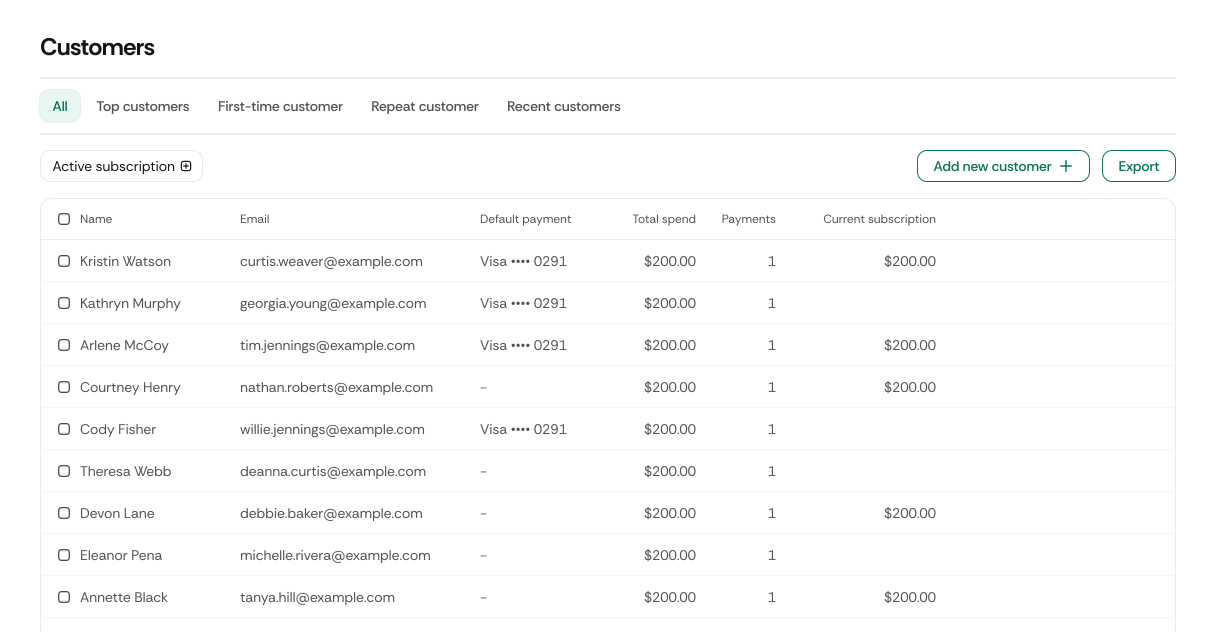
You can filter the list of customers using the following tabs:
| Tab Name | Description |
|---|---|
| All | Displays every customer in your tenant. |
| Top customers | Shows customers with the highest spend or lifetime value. |
| First time customer | Shows customers who have made only one purchase or subscription. |
| Repeat customer | Shows customers with multiple purchases or renewals. |
Below the Filter tabs, you will see the Active subscriptions filter that:
- Allows you to filter customers by subscription status.
- Click Apply to update the results.
This filter is useful if you want to identify customers who currently do not have an active subscription.
| Button | Description |
|---|---|
| Add new customer | Opens a form to manually create a new customer profile in your tenant. |
| Export | Exports the customer list. When checkboxes are selected, export applies only to those selected customers. |
| Sync customers | Fetches the latest customer data from Stripe and updates your tenant accordingly. |
The main part of the page contains a table listing all customers.
| Column Name | Description |
|---|---|
| Name | Customer’s full name. Includes a checkbox. When selected, a bulk-action panel appears (Export, Delete). |
| The customer’s primary contact email. | |
| Default payment | Displays the customer’s default payment method if available. |
| Total Spend | The total amount the customer has paid over their lifetime. |
| Payments | The number of payments associated with the customer. |
| Current subscription | Shows the customer’s active subscription status, if any. |
When you hover over a customer row, a View details option appears.
Clicking it opens the detailed customer profile where you can review:
- Customer personal info
- Payment methods
- Invoices
- Subscription(s)
- Transactions history
For details on the detailed customer profile, refer to the section Update Customers.